
Please login into Million Accounting System and follow these steps:
- Go to Debtors, Select Receive Payment

- Click Add button
1. Bank Group - Selecting Bank or Cash
2. Date - When you receive the cheque. Post dated will be post dated date.
3. Bank / cash - Petty cash select cash, posted cheque estimate which bank to bank in.
4. Debtor A/c - Select the Customer or Debtor.
5. Project - Short period project or your branch.
|
6 Auto Reference no . Note : Last no. Yr 15 Month 11 Last OR No is 20 the next no is OR 151120
|
 |
7. Cheque No . ( Cash or Customer / Debtor cheque )
8. Amount - Amount receive.
9. Amount to knock off - tick the inv paid.

10. Selecting Part Payment -> 11. Edit

12. Edit - Key in the part payment -> 13. Ok
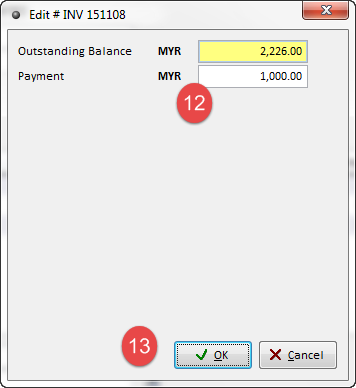
14. Double check the amount part payment RM 1,000 and outstanding balance RM 1,226.00
15. Continue select the balance.RM 1,528.00 and outstanding for inv 151112 is RM 327.00
16. Tick the arrow. The invoice no will be auto paste on payment for.
17. Ok
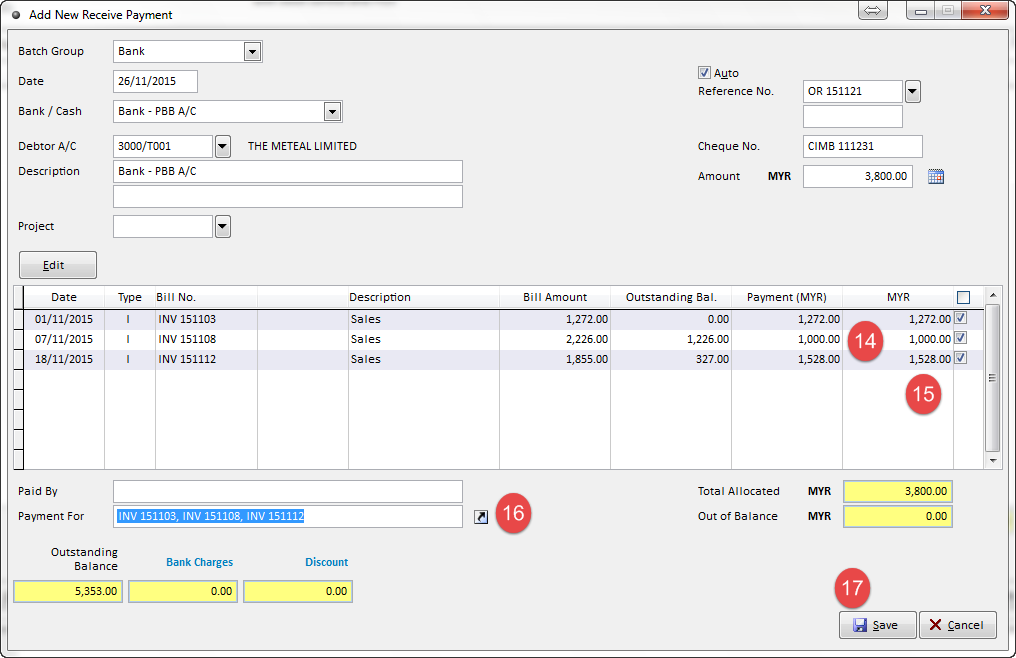
- Maintain Batch Group, Date, Bank/Cash, Debtor A/C, Reference No., Cheque No., Amount, Select which bills to knock off.
- Click Save button.
- For more information, please watch our watch our video tutorial of How To Maintain Debtors Receive Payment