
Please login into Million Accounting System and follow these steps:
- Go to 1. Creditors -> 2. Purchase Invoice
- Click 3. Add button
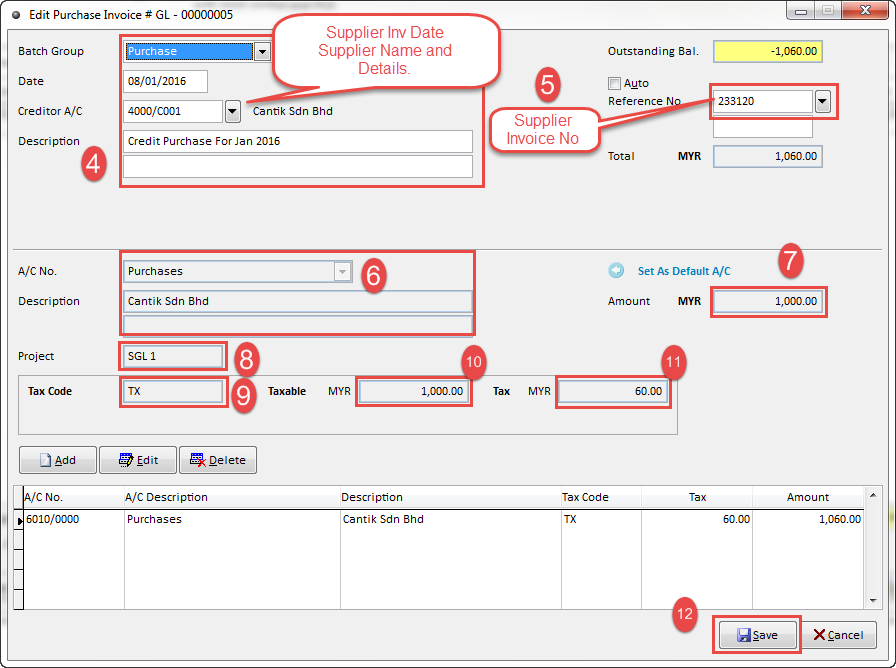
- 4. Select Batch Group - Purchase -> Date (Supplier Invoice Date) -> Select Supplier / Creditor Name -> Keyin Description.
- 5. Key in Supplier / Creditor Invoice No
- 6. A/c No - Choosing Purchases ( You can Set As Default A/C)
- 7. Key in Supplier / Creditor Invoice Before Tax 1,000.00
- 8. Project ( If you have branches )
-9. eg. RM 1,000.00 + Tax RM 60.00 -> TX
RM 1,000.00 + Tax RM 56.60 -> TXI
- 10 & 11 is auto generated.
- 12. Finish Click -> Save
- For more information, please watch our watch our video tutorial of How To Add Creditors Purchase Invoice